Compatible Devices
- Intel CPU New MacBook Air & Pro 13/15/16 (With Thunderbolt 3 Ports) / MacBook 12 / New iMac / iMac Pro/ Mac Mini
- New M1 chip MacBook Air 13/ MacBook Pro 13/ Mac Mini (Only support 1 external monitor, due to M1 chip’s limitation)
Specifically
- MacBook Pro introduced in 2016 or later
- MacBook Air introduced in 2018 or later
- iMac introduced in 2017 or later
- iMac Pro (all models)
- Mac mini introduced in 2018
- Mac Pro introduced in 2019
- MacBook Pro introduced in 2020
- MacBook Air introduced in 2020
- Mac mini introduced in 2020
- Dell XPS 13 / XPS 15 / Inspiron 13 / Inspiron 15 / HP Spectre / Spectre X360 / ENVY / ENVY X360 / EliteBook
- ASUS ZenBook3 / ZenBook Pro / ZenBook Flip / ZenFone 3 Ultra / Liquid Jade Primo
- Chrome / Chrome Pixelbook / Lenovo Yoga 930 / 920 / 910 / 720 / Huawei Matebook
Notes about Multi Stream Transport (MST) or Single Stream Transfer (SST), When using 2-3 video ports at the same time:
- Support most WindowsOS devices to display split screens (ABC/MST) or one mirroring screen (ABB/SST) at Extend Mode
- Support Mac/iPad/ChromeOS devices to display one mirroring screen (ABB/SST) at Extend Mode Only, Not support MST
On Windows System:
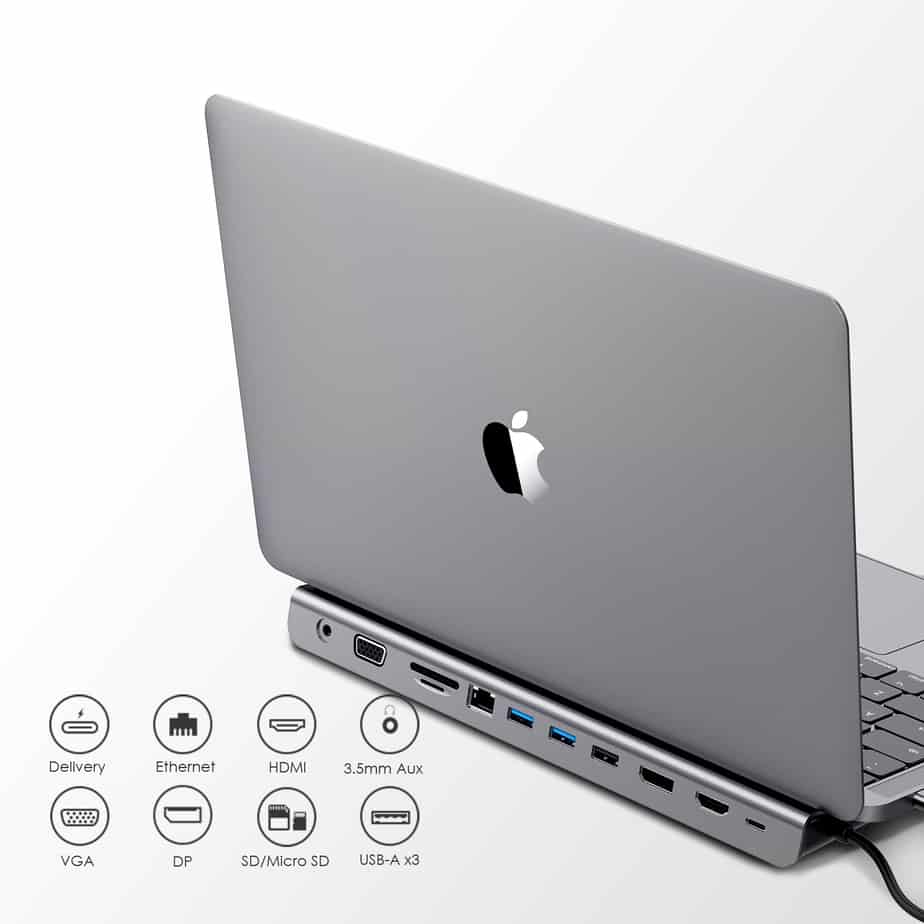
- DP + HDMI, two signals (MST/SST) are displayed at the same time, up to 3840X2160@30Hz
- DP/HDMI + VGA, two signals (MST/SST) are displayed at the same time, up to 1920×1080@60Hz
- DP + HDMI + VGA, three signals (MST/SST) are displayed at the same time, up to 1280×720@60Hz
- Three Video Output (HDMI + DisplayPort + VGA) can display up to three split screens (MST) on Windows OS
On Mac/Chrome/iPad System:
- DP + HDMI, two signals (SST) are displayed at the same time, up to 3840X2160@30Hz
- DP/HDMI + VGA, two signals (SST) are displayed at the same time, up to 1920×1080@60Hz
- DP + HDMI + VGA, three signals (SST) are displayed at the same time, up to 1920×1080@60Hz
- Three Video Output (HDMI + DisplayPort + VGA) can Only display a mirroring screen (SST) on Mac/Chrome/iPad OS, that is all the output screens are the same view
Mulitiple Displays Compatible Note (Tested):
- Support SST Mode only: MacBook Pro (2020/2019/2018/2017/2016), MacBook Air 2018-2020, MacBook 12, Mac mini 2018-2020, iPad Pro 2018-2020, Chromebook
- Support MST Mode and SST Mode: Dell XPS12(9250) / Dell XPS13(9350) / Dell XPS15(9550), Dell Latitude 13 7000 / E7370, Lenovo Yoga 720 / Yoga 900 / Yoga 910 / Yoga 920 /Yoga 930, ASUS Zenbook UX330UA, Microsoft Surface Book 2 / Surface Go / Surface Pro 7 / Surface Laptop 3
- Only one port can be used (limited by the device itself) : M1 New MacBook Pro and Air, HP Spectre 360 etc. (Note: It seems that HP devices have more restrictions than other devices)
Important note:
- The connected USB-C port is required to support “DisplayPort Alternate Mode” (not all USB-C ports support)
Incompatible List:
- HP EliteBook 745 G4 / HP EliteBook 820 G3 / HP EliteBook 828 G4 / HP 14s-be102TX / HP 14-ce1004TX 14 / HP Probook 650 G2 / HP Probook 455 G4 / HP Probook 430 G5 / HP Pavilion-14x HP Pa151 ck009 / HP Pavilion Power Laptop 15-cb
- ZenBook 13 Ultra-Slim, Ideapad L340/340s / Lenovo ideapad 340s, Tablet PC / Google Pixel phone / Nintendo Switch / Acer Aspire A5 / Oneplus 5T Phone






Reviews
There are no reviews yet.